> ## Documentation Index
> Fetch the complete documentation index at: https://docs.recepta.ai/llms.txt
> Use this file to discover all available pages before exploring further.
# How to Forward Calls from Vonage to Recepta.ai
> Complete guide to forwarding your Vonage calls to Recepta.ai Voice Agent
## Overview
Vonage customers can configure call forwarding to enable your Recepta.ai voice agent to answer incoming calls. This guide walks you through the complete setup process, from obtaining your Recepta.ai phone number to configuring Vonage's call routing.
## Getting Your Recepta.ai Phone Number
Before configuring Vonage, you'll need to obtain your dedicated Recepta.ai phone number.
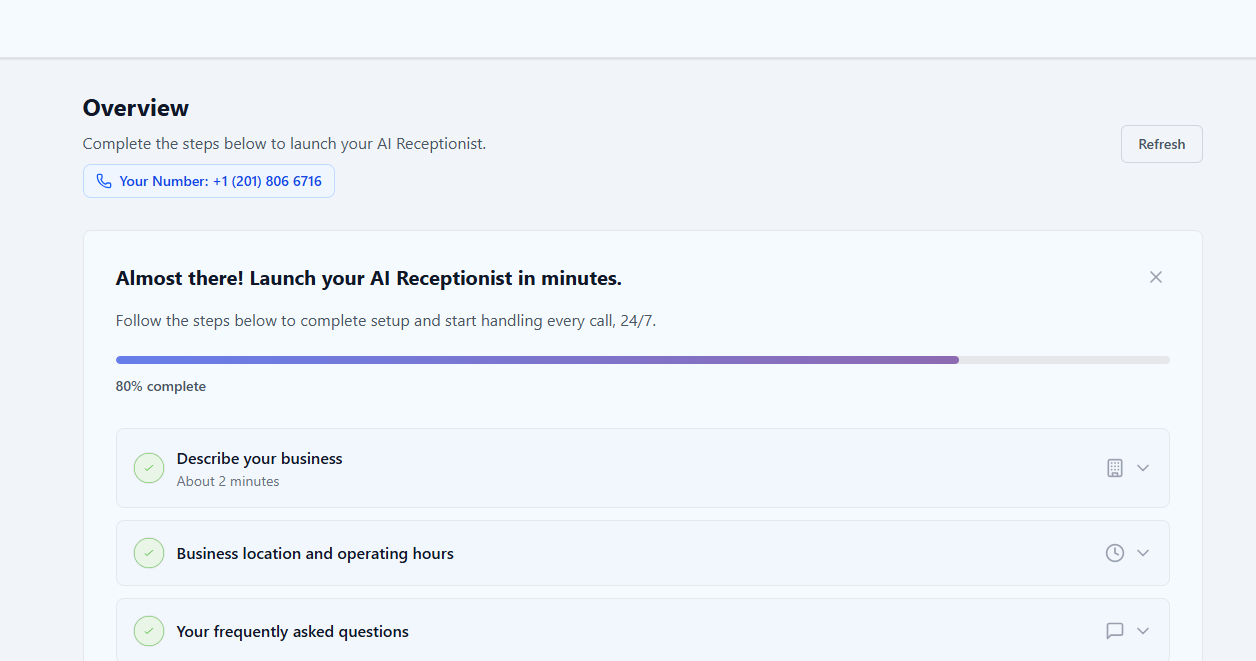
Navigate to your Recepta.ai dashboard at [https://recepta.ai/dashboard](https://recepta.ai/dashboard)
Your Recepta.ai phone number will be displayed prominently in the dashboard. Copy this number as you'll need it for the Vonage configuration.
 Ensure you have completed setting up your AI voice agent's call instructions and configuration before proceeding with call forwarding.
Keep your Recepta.ai phone number handy - you'll need to enter it into Vonage's forwarding settings.
***
## Configuring Call Forwarding in Vonage
Vonage's interface may change over time. For the most current instructions, we recommend consulting Vonage's official documentation.
### Setup Instructions
Visit Vonage's official call forwarding guide for the most up-to-date configuration instructions:
[Vonage: How to Forward Calls](https://www.vonage.com/resources/articles/how-to-forward-calls/)
Access your Vonage account portal
Follow Vonage's instructions to access call forwarding settings
Set your Recepta.ai phone number as the forwarding destination
Save your settings and activate call forwarding
Make a test call to verify calls are routing correctly to your Recepta.ai voice agent
***
## Call Forwarding Strategies
Choose the strategy that best fits your business needs:
**Best for**: Businesses wanting complete AI automation
**Setup**: Forward all calls directly to Recepta.ai phone number
**Benefits**:
* No missed calls
* Consistent service 24/7
* Reduced operational costs
* Instant call pickup
* Predictable customer experience
**Best for**: Professionals who want to screen calls personally
**Setup**: Ring your personal cell phone for 5-8 seconds, then forward to Recepta.ai if unanswered
**Benefits**:
* Option for personal pickup
* AI handles missed calls
* No calls go to voicemail
* Flexible coverage
Keep ring times under 10 seconds maximum. Many callers will hang up if they wait too long before reaching someone.
**Best for**: Businesses with defined operating hours
**Setup**: Different routing for business hours vs after-hours
**Benefits**:
* Optimize for different times
* Cost-effective coverage
* Team handles calls when available
* AI ensures 24/7 availability
* Custom holiday routing
***
## Important Configuration Tips
### Ring Time Management
**Critical**: Do not allow more than 10 seconds ring time before forwarding to Recepta.ai.
Many callers will hang up if they wait too long, defeating the purpose of having AI coverage.
If you choose to ring your personal cell phone before falling back to Recepta.ai:
* **Maximum Ring Time**: 5-8 seconds (10 seconds absolute maximum)
* **Sequential Mode**: Ensure phones ring one after another, not simultaneously
* **Caller Experience**: Minimize wait time for better caller retention
* **Test Thoroughly**: Make multiple test calls to verify timing
**Why Ring Time Matters**:
* 0-5 seconds: Excellent caller retention
* 5-10 seconds: Good caller retention
* 10-15 seconds: Significant caller drop-off
* 15+ seconds: High abandonment rate
### Preventing Infinite Call Loops
**Avoid Infinite Loops**: If your Recepta.ai agent has you as a transfer destination, the transfer number **must be different** from your main Vonage number. Otherwise, calls will get stuck in an infinite loop.
**Safe Configuration Example**:
* Main Vonage Number: Forwards to Recepta.ai → ✅ Correct
* AI Agent Transfer Destination: Your direct cell phone → ✅ Correct
* ❌ **WRONG**: AI transfers back to main Vonage number (creates loop)
**Why This Matters**:
If calls forward from Vonage → Recepta.ai → back to Vonage, they'll loop forever, creating:
* Poor customer experience
* Potential service charges
* System overload
* Frustrated callers who hang up
***
## Advanced Configuration Options
### Business Hours Routing
Configure different routing rules based on your business hours:
**Option 1**: Route to your team with AI overflow
**Option 2**: Direct to AI for consistent handling
Route all calls directly to Recepta.ai for 24/7 coverage
Configure weekend-specific routing rules
Set special routing rules for holidays and special occasions
### Multi-Level Routing Strategy
For businesses that want a hybrid approach:
Ring your personal or team line for 5 seconds
If unanswered, ring backup contacts for 3-5 seconds
Finally forward to Recepta.ai to ensure no calls are missed
Keep total wait time under 10 seconds across all routing steps to maintain caller engagement.
***
## Alternative: Cell Phone Carrier Forwarding
If you want Vonage calls to ring your cell phone for 5-8 seconds before falling back to Recepta.ai, you can use your cell phone carrier's conditional call forwarding feature.
### Setup Process
Configure Vonage to forward all calls to your cell phone
Set up conditional call forwarding with your cell phone carrier:
* Forward on busy: To Recepta.ai
* Forward on no answer: To Recepta.ai (after 5-8 seconds)
Test when you answer and when you don't answer to verify proper behavior
Conditional call forwarding availability and setup vary by carrier. Contact your cell phone carrier for specific instructions.
***
## Testing Your Configuration
Thorough testing ensures your setup works correctly in all scenarios:
Call your Vonage number to verify it forwards to Recepta.ai
If configured, test during and outside business hours
If using sequential routing, verify proper fallback timing
Let calls ring without answering to verify AI pickup
Verify AI agent transfers work without creating loops
Call from different phone numbers to test various scenarios
Check logs in both Vonage and Recepta.ai dashboards
***
## Troubleshooting
**Diagnostic Steps**:
* Verify correct Recepta.ai phone number is entered in Vonage
* Check that call forwarding is enabled and active
* Ensure your Recepta.ai agent is configured and active
* Review Vonage's call routing settings
* Make test call and review logs in both systems
**Common Causes**:
* Typo in Recepta.ai phone number
* Forwarding not activated
* Conflicting call handling rules
* AI agent not active or misconfigured
* Vonage service issue
**Solutions**:
* Reduce ring time before forwarding (max 10 seconds)
* Ensure Recepta.ai is set as primary forwarding destination
* Disable or extend voicemail delay in Vonage settings
* Check that forwarding rule takes precedence over voicemail
* Verify forwarding is active 24/7 (if desired)
**Best Practice**:
Set ring time to 5-8 seconds to ensure AI pickup before voicemail triggers
**Solutions**:
* Use different phone numbers for transfers
* Never forward Vonage number to itself
* Configure AI transfers to direct lines (cell/desk phones)
* Review complete call flow logic
* Document your routing to avoid loops
**Example Safe Setup**:
```
Caller → Vonage Main → Recepta.ai → Transfer to Cell Phone
(Each step uses a different number)
```
**Warning Signs of a Loop**:
* Calls disconnect automatically after ringing
* Unusual call duration patterns in logs
* Multiple entries for the same call
* Callers reporting being "bounced around"
**Solutions**:
* Reduce sequential ring time to 5-8 seconds maximum
* Eliminate unnecessary routing steps
* Consider direct forwarding to AI
* Remove simultaneous ringing (use sequential)
* Test and optimize ring duration
**Impact**:
Research shows every additional second of wait time increases caller abandonment rate significantly.
**Solutions**:
* Contact your cell phone carrier for support
* Verify conditional forwarding is supported on your plan
* Check forwarding codes are entered correctly
* Test both "busy" and "no answer" scenarios
* Consider using direct Vonage forwarding instead
***
## Monitoring and Analytics
### Tracking Performance
Monitor call volume, routing patterns, and forwarding statistics
Track AI performance, conversation quality, and outcomes
Review detailed logs from both systems to identify issues
Measure customer satisfaction and agent performance
### Key Metrics to Monitor
* **Call Answer Rate**: Percentage of calls successfully handled
* **Average Wait Time**: Time before AI picks up
* **Transfer Rate**: How often AI transfers to humans
* **Call Duration**: Length of AI conversations
* **Customer Satisfaction**: Ratings and feedback
* **Abandonment Rate**: Calls that hang up before pickup
* **Cost Savings**: Compare to previous solution
***
## Best Practices
Keep total ring times under 10 seconds to reduce caller drop-off
Ensure transfer destinations use different numbers to prevent loops
Test your setup monthly to catch configuration changes
Set up special routing for holidays and special events
Review performance weekly to identify issues early
Keep detailed records of your configuration
Keep your AI agent's knowledge base current
Use sequential routing to prevent multiple answers
***
## Use Cases and Examples
### Example 1: Real Estate Agent
**Scenario**: Agent wants to personally answer when available
**Configuration**:
* Ring cell phone for 8 seconds
* Forward to Recepta.ai if busy or unanswered
* AI qualifies leads and schedules showings
* AI transfers urgent matters to cell (uses carrier conditional forwarding)
**Benefit**: Never miss a potential buyer, AI pre-qualifies leads
### Example 2: Medical Practice
**Scenario**: Clinic with defined business hours
**Configuration**:
* Business hours: Ring front desk, overflow to AI
* After hours: Direct to AI
* AI schedules appointments, handles prescription refills
* Emergency calls transferred to on-call doctor
**Benefit**: 24/7 appointment booking, reduced staff workload
### Example 3: Professional Services Firm
**Scenario**: Consulting firm wants consistent client experience
**Configuration**:
* All calls go directly to Recepta.ai
* AI routes to appropriate consultant based on inquiry
* After hours: AI only (schedules callbacks)
* AI handles FAQs about services and pricing
**Benefit**: Instant response time, professional image, scalable
***
## Next Steps
After configuring call forwarding:
Customize your AI agent's responses and behavior
Configure call transfer destinations and rules
Train your AI agent with company-specific information
Monitor performance and optimize call handling
***
## Need Help?
Contact our support team at [support@recepta.ai](mailto:support@recepta.ai)
Visit Vonage's support for platform-specific questions
Book a personalized walkthrough with our team
Browse our comprehensive documentation
Ensure you have completed setting up your AI voice agent's call instructions and configuration before proceeding with call forwarding.
Keep your Recepta.ai phone number handy - you'll need to enter it into Vonage's forwarding settings.
***
## Configuring Call Forwarding in Vonage
Vonage's interface may change over time. For the most current instructions, we recommend consulting Vonage's official documentation.
### Setup Instructions
Visit Vonage's official call forwarding guide for the most up-to-date configuration instructions:
[Vonage: How to Forward Calls](https://www.vonage.com/resources/articles/how-to-forward-calls/)
Access your Vonage account portal
Follow Vonage's instructions to access call forwarding settings
Set your Recepta.ai phone number as the forwarding destination
Save your settings and activate call forwarding
Make a test call to verify calls are routing correctly to your Recepta.ai voice agent
***
## Call Forwarding Strategies
Choose the strategy that best fits your business needs:
**Best for**: Businesses wanting complete AI automation
**Setup**: Forward all calls directly to Recepta.ai phone number
**Benefits**:
* No missed calls
* Consistent service 24/7
* Reduced operational costs
* Instant call pickup
* Predictable customer experience
**Best for**: Professionals who want to screen calls personally
**Setup**: Ring your personal cell phone for 5-8 seconds, then forward to Recepta.ai if unanswered
**Benefits**:
* Option for personal pickup
* AI handles missed calls
* No calls go to voicemail
* Flexible coverage
Keep ring times under 10 seconds maximum. Many callers will hang up if they wait too long before reaching someone.
**Best for**: Businesses with defined operating hours
**Setup**: Different routing for business hours vs after-hours
**Benefits**:
* Optimize for different times
* Cost-effective coverage
* Team handles calls when available
* AI ensures 24/7 availability
* Custom holiday routing
***
## Important Configuration Tips
### Ring Time Management
**Critical**: Do not allow more than 10 seconds ring time before forwarding to Recepta.ai.
Many callers will hang up if they wait too long, defeating the purpose of having AI coverage.
If you choose to ring your personal cell phone before falling back to Recepta.ai:
* **Maximum Ring Time**: 5-8 seconds (10 seconds absolute maximum)
* **Sequential Mode**: Ensure phones ring one after another, not simultaneously
* **Caller Experience**: Minimize wait time for better caller retention
* **Test Thoroughly**: Make multiple test calls to verify timing
**Why Ring Time Matters**:
* 0-5 seconds: Excellent caller retention
* 5-10 seconds: Good caller retention
* 10-15 seconds: Significant caller drop-off
* 15+ seconds: High abandonment rate
### Preventing Infinite Call Loops
**Avoid Infinite Loops**: If your Recepta.ai agent has you as a transfer destination, the transfer number **must be different** from your main Vonage number. Otherwise, calls will get stuck in an infinite loop.
**Safe Configuration Example**:
* Main Vonage Number: Forwards to Recepta.ai → ✅ Correct
* AI Agent Transfer Destination: Your direct cell phone → ✅ Correct
* ❌ **WRONG**: AI transfers back to main Vonage number (creates loop)
**Why This Matters**:
If calls forward from Vonage → Recepta.ai → back to Vonage, they'll loop forever, creating:
* Poor customer experience
* Potential service charges
* System overload
* Frustrated callers who hang up
***
## Advanced Configuration Options
### Business Hours Routing
Configure different routing rules based on your business hours:
**Option 1**: Route to your team with AI overflow
**Option 2**: Direct to AI for consistent handling
Route all calls directly to Recepta.ai for 24/7 coverage
Configure weekend-specific routing rules
Set special routing rules for holidays and special occasions
### Multi-Level Routing Strategy
For businesses that want a hybrid approach:
Ring your personal or team line for 5 seconds
If unanswered, ring backup contacts for 3-5 seconds
Finally forward to Recepta.ai to ensure no calls are missed
Keep total wait time under 10 seconds across all routing steps to maintain caller engagement.
***
## Alternative: Cell Phone Carrier Forwarding
If you want Vonage calls to ring your cell phone for 5-8 seconds before falling back to Recepta.ai, you can use your cell phone carrier's conditional call forwarding feature.
### Setup Process
Configure Vonage to forward all calls to your cell phone
Set up conditional call forwarding with your cell phone carrier:
* Forward on busy: To Recepta.ai
* Forward on no answer: To Recepta.ai (after 5-8 seconds)
Test when you answer and when you don't answer to verify proper behavior
Conditional call forwarding availability and setup vary by carrier. Contact your cell phone carrier for specific instructions.
***
## Testing Your Configuration
Thorough testing ensures your setup works correctly in all scenarios:
Call your Vonage number to verify it forwards to Recepta.ai
If configured, test during and outside business hours
If using sequential routing, verify proper fallback timing
Let calls ring without answering to verify AI pickup
Verify AI agent transfers work without creating loops
Call from different phone numbers to test various scenarios
Check logs in both Vonage and Recepta.ai dashboards
***
## Troubleshooting
**Diagnostic Steps**:
* Verify correct Recepta.ai phone number is entered in Vonage
* Check that call forwarding is enabled and active
* Ensure your Recepta.ai agent is configured and active
* Review Vonage's call routing settings
* Make test call and review logs in both systems
**Common Causes**:
* Typo in Recepta.ai phone number
* Forwarding not activated
* Conflicting call handling rules
* AI agent not active or misconfigured
* Vonage service issue
**Solutions**:
* Reduce ring time before forwarding (max 10 seconds)
* Ensure Recepta.ai is set as primary forwarding destination
* Disable or extend voicemail delay in Vonage settings
* Check that forwarding rule takes precedence over voicemail
* Verify forwarding is active 24/7 (if desired)
**Best Practice**:
Set ring time to 5-8 seconds to ensure AI pickup before voicemail triggers
**Solutions**:
* Use different phone numbers for transfers
* Never forward Vonage number to itself
* Configure AI transfers to direct lines (cell/desk phones)
* Review complete call flow logic
* Document your routing to avoid loops
**Example Safe Setup**:
```
Caller → Vonage Main → Recepta.ai → Transfer to Cell Phone
(Each step uses a different number)
```
**Warning Signs of a Loop**:
* Calls disconnect automatically after ringing
* Unusual call duration patterns in logs
* Multiple entries for the same call
* Callers reporting being "bounced around"
**Solutions**:
* Reduce sequential ring time to 5-8 seconds maximum
* Eliminate unnecessary routing steps
* Consider direct forwarding to AI
* Remove simultaneous ringing (use sequential)
* Test and optimize ring duration
**Impact**:
Research shows every additional second of wait time increases caller abandonment rate significantly.
**Solutions**:
* Contact your cell phone carrier for support
* Verify conditional forwarding is supported on your plan
* Check forwarding codes are entered correctly
* Test both "busy" and "no answer" scenarios
* Consider using direct Vonage forwarding instead
***
## Monitoring and Analytics
### Tracking Performance
Monitor call volume, routing patterns, and forwarding statistics
Track AI performance, conversation quality, and outcomes
Review detailed logs from both systems to identify issues
Measure customer satisfaction and agent performance
### Key Metrics to Monitor
* **Call Answer Rate**: Percentage of calls successfully handled
* **Average Wait Time**: Time before AI picks up
* **Transfer Rate**: How often AI transfers to humans
* **Call Duration**: Length of AI conversations
* **Customer Satisfaction**: Ratings and feedback
* **Abandonment Rate**: Calls that hang up before pickup
* **Cost Savings**: Compare to previous solution
***
## Best Practices
Keep total ring times under 10 seconds to reduce caller drop-off
Ensure transfer destinations use different numbers to prevent loops
Test your setup monthly to catch configuration changes
Set up special routing for holidays and special events
Review performance weekly to identify issues early
Keep detailed records of your configuration
Keep your AI agent's knowledge base current
Use sequential routing to prevent multiple answers
***
## Use Cases and Examples
### Example 1: Real Estate Agent
**Scenario**: Agent wants to personally answer when available
**Configuration**:
* Ring cell phone for 8 seconds
* Forward to Recepta.ai if busy or unanswered
* AI qualifies leads and schedules showings
* AI transfers urgent matters to cell (uses carrier conditional forwarding)
**Benefit**: Never miss a potential buyer, AI pre-qualifies leads
### Example 2: Medical Practice
**Scenario**: Clinic with defined business hours
**Configuration**:
* Business hours: Ring front desk, overflow to AI
* After hours: Direct to AI
* AI schedules appointments, handles prescription refills
* Emergency calls transferred to on-call doctor
**Benefit**: 24/7 appointment booking, reduced staff workload
### Example 3: Professional Services Firm
**Scenario**: Consulting firm wants consistent client experience
**Configuration**:
* All calls go directly to Recepta.ai
* AI routes to appropriate consultant based on inquiry
* After hours: AI only (schedules callbacks)
* AI handles FAQs about services and pricing
**Benefit**: Instant response time, professional image, scalable
***
## Next Steps
After configuring call forwarding:
Customize your AI agent's responses and behavior
Configure call transfer destinations and rules
Train your AI agent with company-specific information
Monitor performance and optimize call handling
***
## Need Help?
Contact our support team at [support@recepta.ai](mailto:support@recepta.ai)
Visit Vonage's support for platform-specific questions
Book a personalized walkthrough with our team
Browse our comprehensive documentation